| InstallSteps | ||||||||||||||||||||||||||||||||||||||||||||||||||
| *** | Proxmox | |||||||||||||||||||||||||||||||||||||||||||||||||
| Ver | InstallSteps | |||||||||||||||||||||||||||||||||||||||||||||||||
| 1/31/24 | ||||||||||||||||||||||||||||||||||||||||||||||||||
|
||||||||||||||||||||||||||||||||||||||||||||||||||
| Dashboard.htm | ||||||||||||||||||||||||||||||||||||||||||||||||||
| InstallSteps | Don't Install Proxmox Until you see this! (11 steps) | |||||||||||||||||||||||||||||||||||||||||||||||||
| Proxmox | 00:00 – Intro | |||||||||||||||||||||||||||||||||||||||||||||||||
| shell | 1 | 00:34 – Build USB | ||||||||||||||||||||||||||||||||||||||||||||||||
| Helper_Scripts | 2 | 01:24 – Install proxmox | choose the "xfs" filesystem | |||||||||||||||||||||||||||||||||||||||||||||||
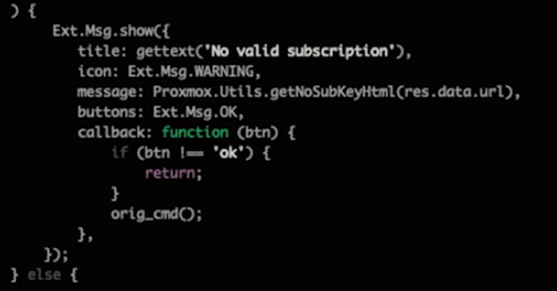
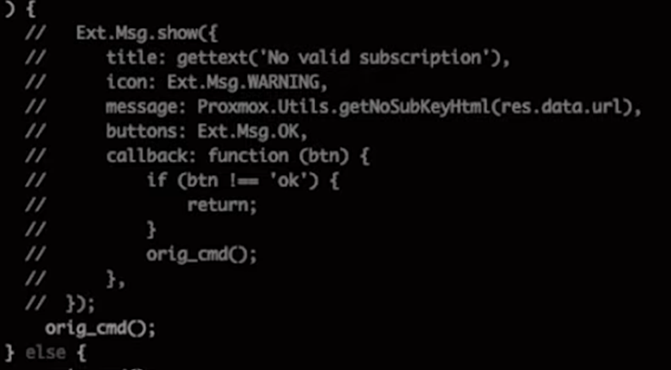
| Podman | 3 | 02:28 –Remove "no valid subscription" message | ||||||||||||||||||||||||||||||||||||||||||||||||
| Simple Homelab | # | cd /usr/share/javascript/proxmox-widget-toolkit/ | ||||||||||||||||||||||||||||||||||||||||||||||||
| Simple Homelab2 | # | cp proxmoxlib.js proxmoxlib.js-org | ||||||||||||||||||||||||||||||||||||||||||||||||
| glossary | # | nano proxmoxlib.js | ||||||||||||||||||||||||||||||||||||||||||||||||
| ^f No valid | ||||||||||||||||||||||||||||||||||||||||||||||||||
| make edits | ||||||||||||||||||||||||||||||||||||||||||||||||||
| save and exit nano | ||||||||||||||||||||||||||||||||||||||||||||||||||
| # | service pveproxy restart | |||||||||||||||||||||||||||||||||||||||||||||||||
| 4 | 05:23 – Configure Updates | |||||||||||||||||||||||||||||||||||||||||||||||||
| pve1 > Repositories | ||||||||||||||||||||||||||||||||||||||||||||||||||
| click on and "Disable" the two "enterprise" entries | ||||||||||||||||||||||||||||||||||||||||||||||||||
| Add | Add Repository: "No-Subscription" | Add | ||||||||||||||||||||||||||||||||||||||||||||||||
| Add | Add Repository: "Ceph Squid No-Subscription" | Add | ||||||||||||||||||||||||||||||||||||||||||||||||
| pve1 > Updates | ||||||||||||||||||||||||||||||||||||||||||||||||||
| Refresh | when finished, close the pop-up window and then : | |||||||||||||||||||||||||||||||||||||||||||||||||
| Upgrade | should do all the upgrades and then reboot | |||||||||||||||||||||||||||||||||||||||||||||||||
| 5 | 06:24 – Configure storage drive | |||||||||||||||||||||||||||||||||||||||||||||||||
| SSD | where Proxmox is installed, | Disks > select Hard disk > "Wipe Disk" | Are you sure ? | Yes | ||||||||||||||||||||||||||||||||||||||||||||||
| HD | for containers, VM's, … | Disks > Directory > Create: Dir'y > | Disk | /dev/sdb | ||||||||||||||||||||||||||||||||||||||||||||||
| Filesystem | ext4 | |||||||||||||||||||||||||||||||||||||||||||||||||
| Name | datadrive | |||||||||||||||||||||||||||||||||||||||||||||||||
| 6 | 07:32 – Add an external NAS | |||||||||||||||||||||||||||||||||||||||||||||||||
| Datacenter > Storage > Add > SMB/CIFS > | General | |||||||||||||||||||||||||||||||||||||||||||||||||
| ID | NAS | Nodes | ||||||||||||||||||||||||||||||||||||||||||||||||
| Server | 192.168.0.17 | Enable | ||||||||||||||||||||||||||||||||||||||||||||||||
| Username | mdh | Content | Disk image, ISO image, | |||||||||||||||||||||||||||||||||||||||||||||||
| Passwd | mdh | Domain | ||||||||||||||||||||||||||||||||||||||||||||||||
| 08:39 – Set Storage Content Selection | Share | My_Nas | Subdir'y | /some/path | ||||||||||||||||||||||||||||||||||||||||||||||
| Add | ||||||||||||||||||||||||||||||||||||||||||||||||||
| 7 | 09:09 – Must have troubleshooting tools | |||||||||||||||||||||||||||||||||||||||||||||||||
| # | apt install htop iftop ncdu btop smartmontools lm-sensors -y | |||||||||||||||||||||||||||||||||||||||||||||||||
| # | sensors detect --auto | |||||||||||||||||||||||||||||||||||||||||||||||||
| 8 | 09:56 – Helper scripts - building a container | |||||||||||||||||||||||||||||||||||||||||||||||||
| Proxmox helper scripts | ||||||||||||||||||||||||||||||||||||||||||||||||||
| 9 | 10:57 – Configure Backups | |||||||||||||||||||||||||||||||||||||||||||||||||
| 10 | 12:21 – Restore a vm or container | |||||||||||||||||||||||||||||||||||||||||||||||||
| 11 | 13:05 – Configure private networks | |||||||||||||||||||||||||||||||||||||||||||||||||
| pve01 > System > Network > | Create | > Linux Bridge | ||||||||||||||||||||||||||||||||||||||||||||||||
| 14:31 – Outro | ||||||||||||||||||||||||||||||||||||||||||||||||||
| InstallSteps | ||||||||||||||||||||||||||||||||||||||||||||||||||